Entering Masked BC in Phillips Hearsuite

Fossil

New Member
Joined
Feb 1, 2025
Messages
11
Reaction score
0
I am a relative newbie, however after 8 months going back and forth to my local Costco, and even switching to the Dept Manager, as they are not customer oriented or performance driven. They don't listen to the customer to really understand the problem, and ignore most complaints, and don't have the technical understanding and aptitude to be doing the job they are assigned. I complained about wire lengths being too long at 2 week follow up, and got a BS answer rather than the right wire length. The manager finally fixed that problem 2 weeks ago. They were so long they floated above ear and fell off ears. Simple change from 3 to 2 solved issue. They should have used fitting tool in first place, but did not. The list is long so just touching on some of issues with this Costco.

So after trying to avoid DIY, I jumped in Head First. I been programmed my Phillips 9050's for a several days now, and I have found solutions to my problems that Costco either did not know about or were unwilling to do. Either way, never going back to NOT dialing in hearing aids myself.

Now to my question. How do you enter Masked Bone Conduction (BC) measurements in Phillips Hearsuite Fitting Softeware, version 25.1? I see how to enter unmasked, but don't know how to enter masked?

Would really appreciate some help here, as the instructions are very very skimpy and my training is watching a lot of youtube videos to get to this point but have not seen details like this for entering audiogram data. I do have a basic understanding of sound and have done Room Correction of my home theater, so is very similar in a lot of ways.
 
4. When would an HCP choose to exclude bone conduction thresholds from the prescription formula calculation?
The default is to include bone conduction values, but this can be changed to exclude them in the
audiogram screen. An HCP may choose to exclude bone conduction thresholds in situations where
the member has severe conductive hearing loss with air-bone gaps of 30 dB or greater at two or more
frequencies.


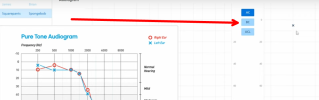
Select BC to enter Bone Conduction values similar to entering PTA/Pure Tone Audiometry values;
c1.png
 
PVC,

Thanks for responding, however you did not answer the question I asked. BC can be masked or unmasked. Entering at BC only enters unmasked values. My right ear values are unmasked, while my left ear are masked values.

Does masked mean more than 30db of air-bone gaps and value shown on autogram has been adjusted?

Yes I could just leave out BC and UC levels. Being a newbie, I was trying to enter all available data, and let software do it's thing. As is, I entered masked BC values in as unmasked, as could not find option to enter unmasked.

I would like to understand more, to understand what is needed and effects.

BTW, I only see Chapter 1 and 2, which I downloaded and read. Where are the rest of the chapters?

Thanks
 
Last edited:
Try right-mouse-button click [BC] to see if it gives you a choice.

You are better equipped to answer your question because I don't have Philips HearSuite loaded and I don't have any Philips hearing aids.

Use the Help feature in Philips HearSuite. You should be able to find a (Help Search-Box); then type "Bone Conduction" and press Enter or Click Search. That should give you plenty to read.
 
I would appreciate knowing where I can get more than Chapter's 1 and 2 that are the only chapters on your link for version 2.2 of DIY School?

Obviously you have not used the Phillips Software. There ain't anything to read. As close to NO instructions as you can get. The Oticon Software in your examples, has a lot more options. Perhaps for the Phillips Price, you also get skinny software? It appears OK, as I have vastly improved my hearings aids over Costco Setup. I even improved feedback situation, on their setup by rerunning on my setup. Kinda makes you wonder about their setup?

I tried right click on BC, and every other trick to no avail.

Costco's printout shows Unmasked Symbol, but I see no way to enter it manually on Philips Hearsuite.

Again, the information contained in DIY School 2.2 was very value-able, but I am missing beyond Chapter 2. Where are the other Chapters?

Thank You
 
The DIY School Hearing Aids (v2.2) access portals are at your finger tips via 24/7 cloud storage access.
  • Start here → DIY School Hearing Aids (v2.2) to find the access portals
  • You can easily find the Access Portals again/anytime, by clicking any PVC Avatar (click twice - counting the 2nd popup Avatar)
  • When logged in, you can find the Access Portals again/anytime, by clicking a Link in my Signature
  • And finally, you can perform a simple Internet search for "DIY School Hearing Aids"
Suggested Reading: DIY School Hearing Aids (v2.2) PDF file named (02 How to Program your Hearing Aids);
  • Step 3 – Choose (1 of 3) origins for measuring your hearing loss
  • Step 4 – Save your Original Professional Settings (if any)
This may or may not be useful to you;
AI Overview
Air Conduction vs. Bone Conduction: Candidacy Guide for Bone ...
Audiologists perform bone conduction tests to determine the type and location of hearing loss, specifically differentiating between conductive and sensorineural hearing loss. This test bypasses the outer and middle ear, delivering sound vibrations directly to the inner ear (cochlea) to assess its function.
Here's a more detailed explanation:
Differentiating hearing loss types:
Bone conduction testing helps determine if the hearing loss is conductive (problem in the outer or middle ear) or sensorineural (problem in the inner ear or auditory nerve).
Bypassing the outer and middle ear:
By placing a bone oscillator on the mastoid bone, sound vibrations bypass the outer and middle ear, allowing audiologists to assess the inner ear's response to sound.
Comparing with air conduction results:
The results of the bone conduction test are compared with the results of an air conduction test (which assesses hearing through headphones), providing a comprehensive picture of the hearing loss.
Pinpointing the location of the problem:
If bone conduction thresholds are significantly better than air conduction thresholds, it suggests a conductive hearing loss, indicating a problem in the outer or middle ear.
Assessing inner ear function:
If both bone and air conduction thresholds are poor, it indicates sensorineural hearing loss, suggesting a problem with the inner ear or auditory nerve.
Common causes of conductive hearing loss:
These include earwax buildup, fluid in the middle ear, eardrum perforation, or middle ear bone abnormalities.
Common causes of sensorineural hearing loss:
These include damage to the hair cells in the cochlea, nerve damage, or issues with the auditory nerve.

AI Overview
In bone conduction hearing tests, "masked" and "unmasked" refer to whether masking noise is used to isolate the hearing of the test ear. Unmasked bone conduction testing is the standard method, where sounds are presented to the mastoid bone, and the better-hearing ear will respond, even if the sound is presented to the poorer-hearing ear. Masked bone conduction testing uses masking noise in the non-test ear to isolate the hearing of the test ear and ensure the responses are solely from that ear.
Unmasked Bone Conduction Testing:
Standard procedure: This is the initial step in bone conduction testing.
Cross-hearing: The sound presented to the mastoid bone can travel through the skull and be heard by the better-hearing ear, even if the stimulus is presented to the poorer-hearing ear.
Purpose: Determines if there is a hearing loss and its type (conductive, sensorineural, or mixed).
Masked Bone Conduction Testing:
Used when cross-hearing is suspected:
If an air-bone gap (difference between air and bone conduction thresholds) is greater than 10 dB, masking is necessary to isolate the hearing of the test ear.
Masking noise:
Noise is presented to the non-test ear to prevent it from hearing the bone-conducted sound, ensuring the test ear's response is isolated.
Accurate threshold measurement:
Masking helps determine the true bone conduction threshold of the test ear, especially in cases of conductive or mixed hearing loss.
Accuracy:
Accurate masking is crucial, especially in cases where financial compensation is at stake, as even small apparent air-bone gaps can be significant.
In essence: Unmasked testing is a starting point, while masked testing is used when cross-hearing may be occurring to ensure accurate assessment of the test ear's hearing.
 
Thanks that was helpful to understand why masking is used in my case with asymmetric hearing loss. So it would appear Philips software only needs BC for each ear, and the fact that masking was used to isolate worst ear, is not a needed input to run the algorithms?

Since Costco employs hearing fitters rather than degreed audiologists, and bargain prices, that may explain why Philips software may be more 'Cook Book' than Oticon?

I know comparing technical spefication brochures for Oticon, they provide more detailed fitting information than Phillips.

Perhaps the US blessing OTC hearing aids will motivate the prescription hearing manufacture's to provide more fitting information online for DIY'ers and make it easier to acquire fitting software?

One can hope anyways?

I for one will acquire fitting software in future, prior to purchase of any brand of hearing aid, so that I can rest assured I can experiment and dial in the aids myself, in case hearing professional won't or can't do it.

I have needed hearing aids for 30 years or more, but avoided because my dad and others did not seem to be helped by them. I never realized why, till I was forced into DIY.
 
Use the Help feature in Philips HearSuite. You should be able to find a (Help Search-Box); then type "Bone Conduction" and press Enter or Click Search. That should give you plenty to read.
Obviously you have not used the Phillips Software. There ain't anything to read. As close to NO instructions as you can get. The Oticon Software in your examples, has a lot more options. Perhaps for the Phillips Price, you also get skinny software?
Heavy Sigh...
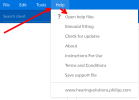
Click Help, then Click "? Open help files"
c0.png
Type "BC" in the Search Box and Press Enter;

c1.png

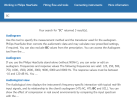
The Search Box results from "BC" are listed below and each has a Clickable-Link that will provide more detailed help. But I will stop here and not show the further detailed help that is available in Philips HearSuite;

c3.png
 
Following the Help in Hearsuite as you cite above , yields very very little about BC and Nothing about masked vs unmasked BC.

Yes I have seen Brian's video, and it was best guidance I found on basic using of Hearsuite, but even in Brian's video he mentions masked and unmasked BC, but states he is not going to get into that in this video.

As a result, my question about loading masked BC still has not been addressed, and remains unanswered.

Heavier Sigh.........
 
Today I registered and completed several courses on the Oticon Genie 2 Fitting Software. It is very similar to Philips but offers a few more options, like simulation mode, and it has very good help section, complete with lots of videos and resources and technical information than Philips. Some of the info is hidden on internet, and you need to link within software to find it.

In a lot of ways I like the layout of the Philips interface more in some ways, but in other ways I like the Oticon better. Clearly the underlining code is all based on same code with perhaps Oticon having a few more tweaks since it is the Premium product. I see the Philips interface as simplifier for production fitters than the Oticon more detailed setup. It is interesting with both being versions 25.1 that they are as different as they are, and that each choses different vocabulary to describe functions or affects.
 
Perhaps the US blessing OTC hearing aids will motivate the prescription hearing manufacture's to provide more fitting information online for DIY'ers and make it easier to acquire fitting software?
Pfft. No it won't. :rolleyes:
 
even in Brian's video he mentions masked and unmasked BC, but states he is not going to get into that in this video.
I am not going to get into that either. Ask your Audiologist.
 
It is interesting with both being versions 25.1 that they are as different as they are, and that each choses different vocabulary to describe functions or affects.
If you would read about Sister Company relationships in the hearing aid industry, then maybe you would understand more about the software differences.
 
I am not going to get into that either. Ask your Audiologist.
Brian also said he would do a later video on masked and unmasked BC, but the subject was out of scope for his into video
 
Back
Top