Mac/UTM Users-Help needed using UTM + Win 11 ARM on Mac Silicone Based M2: After Update to Phonak Target 10, now can't connect to NoahLink Wireless 2

billzona

New Member
Joined
Jul 23, 2024
Messages
14
Reaction score
4
I have carefully read the "Silicon-based (m1 / m2/ m3) Mac DIY HA Programming Guide w Noahlink Wireless (Tested for Oticon Genie 2024.2)" but can not resolve my issue!

I had been running Phonak Target 9.0-9.1.1 software and connecting to Target Wireless 2 (NWL2)on 2023 Mac Silicon based M2 machine for 18 months VIA UTM + Windows 11 ARM.

I upgraded Target 10.1.1 due to Phonak hearing aid upgrade (Phonak Audéo R Infinio i90). During the entire time using Target 9.xx I had no issue finding and connecting to my NWL2. Since upgrading to Target 10.x I can not connect to NLW2. Exception I have connected to the NWL2 on 5 occasions and had session with the new Infinio i90 aids (requires Target 10.x), that is 5 NLW2+ Infinio i90 connections to NWL2 of 50 attempts. I can not replicate the connection on Target 10.x. If down grade back to Target 9.x my connection to NWL2 is flawless.

I have copied “gluchkukj’s” driver .inf file, removed driver signature enforcement and used the device manager, found the Noahlink driver 1.0.0 driver (oem8.inf) and manually copied and REPLACED to your attached replacement driver file located here.
oem8.inf
- Path: C:\Windows\inf\oem8.inf
- DeviceId: USB\VID_180F&PID_1002
- Version: 1.0.0.0

Any guidance is well appreciated!
Image below: Connection Lost. >>>>>
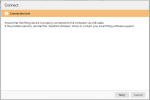
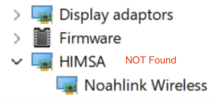
Conn Lost.png it was never found!
 
See a DIY School Hearing Aids (v2.2) PDF File named (Noahlink Wireless 2 – DIY User Guide);
In the Appendix you can find two examples of Windows driver for Noahlink Wireless 2; Which driver are you using?

The driver under HIMSA?
c1-png.1073

The “signed” Windows driver for Noahlink Wireless 2 device under Universal Serial Bus devices?
device-manager-jpg.1059
 
Thank you, I am traveling without my computer. Once back home I will complete this task...
 
Hi PVC, regarding your query on which driver am I using? I find the later in your 2 example images. Under "Device Manager / USB Device" I find the same Signed Driver version you sent (image below). I DO NOT find Device Manager / HIMSA / Noahlink Wireless item. Which driver file is needed? I will review the AliExpress thread now. Kindly advise if you have suggestion regarding the replacement of USB Device Signed Driver. Thanks!
 

Attachments

  • Screenshot 2025-04-19 at 15.18.22.png
    Screenshot 2025-04-19 at 15.18.22.png
    153.3 KB · Views: 2
  • Screenshot 2025-04-19 at 15.19.48.png
    Screenshot 2025-04-19 at 15.19.48.png
    95.4 KB · Views: 2
Again Greetings PVC, I have read the AliExpress: it is an informative thread. I do not have the HIMSA tab under Device Manager as you disabled in the Ali thread. I double checked my NLW2 firmware is 3.17, same as you noted. I never had any issue with Target 9.1.1 connecting to my NWL2. In fact I have connected Target 10.1.1 a total of 5 times to my Phonak i90 via my NWL2. Note 5 connections of 50 attempts and cant seem to reconnect. Reminder I am UTM + Win11 ARM on Silicon Mac....(Ouch!).
 

Attachments

  • Screenshot 2025-04-19 at 15.54.09.png
    Screenshot 2025-04-19 at 15.54.09.png
    33.7 KB · Views: 0
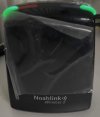
This photo is live now. Connected Silicon Mac + UTM + Win11 ARM + Target 9.1.1 = NLW2 connection. If I goto Target 10, no green blinking lights!
 

Attachments

  • Screenshot 2025-04-19 at 16.09.18.jpg
    Screenshot 2025-04-19 at 16.09.18.jpg
    33.2 KB · Views: 1
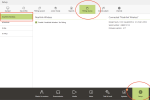
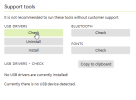
PVC, Regarding driver location discussed above?? In the Target app (Version 9/10) under SETUP in lower bar Screenshot 2025-04-19 at 17.42.18.pngSelect GENERAL on top bar, next select SUPPORT TOOLS.

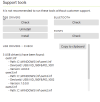
Here Target shows 3 drivers found Path: C:\Windows\inf\. In my case, could oem8.inf Version 1.0.0.0 be the NLW2 Driver or conflicting with the signed driver.

I notice that the Noahlink web site the NLW2 driver download name is "Driver_NLW_V.1.1.0.0.exe". The V.1.1.0.0. suggest connection to the
oem8.inf - Path: C:\Windows\inf\oem8.inf - DeviceId: USB\VID_180F&PID_1002 - Version: 1.0.0.0.

This is confusing to me on which is the actual location and relationship of the .inf drivers with the Device Manager \ USB Device drivers discussed above. Thanks for your consideration. I notice you may not be full time Phonak user.

3 USB driver(s) have been found:
oem9.inf
- Path: C:\Windows\inf\oem9.inf
- DeviceId: USB\VID_180F&PID_1001
- Version: 4.0.0.0
oem8.inf
- Path: C:\Windows\inf\oem8.inf
- DeviceId: USB\VID_180F&PID_1002
- Version: 1.0.0.0
oem10.inf
- Path: C:\Windows\inf\oem10.inf
- DeviceId: USB\VID_180F&PID_1020
- Version: 10.43.53.814
 
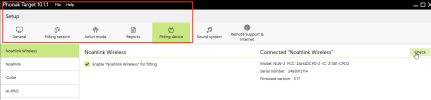
Further inside Target App - Setup / Fitting Device / Noahlink Wireless / Connect show my NLW2 connect to Target 9.1. S/N and Firmware checks. Sad that when I go up to Target 10 this NWL2 does not connect.Screenshot 2025-04-19 at 18.03.28.png
 
Lastly, Here is my Target 10.1.1 app connected to my NWL2 on Silicon Mac + UTM + Win11 ARM. One of 5 connectons in 50 failures! 10 Connected NLW2.png
 
So many variables making this difficult to follow. Thanks for the detailed testing. That was great!!

I am thinking that with your setup of (Target 10.1.1, NWL2 on Silicon Mac + UTM + Win11 ARM) maybe reverting back to the old unsigned driver under HIMSA could possibly work. This, unsigned driver under HIMSA;
c1-png.1073


Perhaps reverting back to the unsigned driver under HIMSA would require these steps;
  • Unplug your Noahlink Wireless 2 device and leave it unplugged until the last step
  • Uninstall Phonak Target 10.1.1
  • Delete the new signed Noahlink Wireless 2 driver under (Universal Serial Bus controllers), which is tricky, See this → Post which is for deleting the device under HIMSA, But you could use similar steps to delete the device under (Universal Serial Bus controllers)
  • Restart your system
  • Install Phonak Target 10.1.1 to hopefully create the old Noahlink Wireless Driver under HIMSA
  • Plug-in your Noahlink Wireless 2 device
If (by some miracle) this works then Phonak Target is not ready for the new Noahlink Wireless 2 driver under Universal Serial Bus Devices. Meanwhile, the old unsigned driver under HIMSA seems to work for both (Noahlink Wireless and Noahlink Wireless 2).
 
Last edited:
Thanks for carefully reviewing my posts. My info cover a long period of Target DIY time testing and trouble shooting.

Q1. Confirm I want to have the HIMSA unsigned driver within Device Manager path and delete the signed Noahlink Wireless 2 driver under (Universal Serial Bus controllers?
I reviewed my historical screenshots of my Device Manager searches I have not seen the HIMSA unsigned driver tab in Device Manager. I am careful to take before and after screenshots to my track DIY changes.

Q2. Do you have any idea of that the oemXX.inf driver seen within the Target App / Settings / General / Support Tools (- Path: C:\Windows\inf\oem8.inf)?

Q3. Would be better to create new Virtual Machine with Win11 ARM installed the follow your steps above? I can create a new Win11 and have a clean slate to avoid any hidden old drivers?

In the past, I have always had my NLW2 mounted during Target install, That idea is a new variation! Fresh idea!

I apologize for the time lag in reply, I live in Thailand 12 hours ahead of USA Central Savings time.

Thanks again for your feedback, it is greatly appreciated.
 
Q1. Confirm I want to have the HIMSA unsigned driver within Device Manager path and delete the signed Noahlink Wireless 2 driver under (Universal Serial Bus controllers?
I reviewed my historical screenshots of my Device Manager searches I have not seen the HIMSA unsigned driver tab in Device Manager. I am careful to take before and after screenshots to my track DIY changes.
Yes. It's a workaround and not ideal. But since the original unsigned/HIMSA driver seem to work for both NW & NW2, the the goal is to kill the signed driver, and use the unsigned/HIMSA driver.
Q2. Do you have any idea of that the oemXX.inf driver seen within the Target App / Settings / General / Support Tools (- Path: C:\Windows\inf\oem8.inf)?
¯\_(ツ)_/¯
In the past, I have always had my NLW2 mounted during Target install, That idea is a new variation! Fresh idea!
No, it's an old prerequisite. Since NLW driver was missing from all Windows Systems, someone has required each manufacturer to provide that unsigned HIMSA driver along with the fitting software install. As long as you install the fitting software before you plug-in your USB device.

And if that fails, there is another workaround;
For Unknow Driver problems, HIMSA has a fix for this using an (.exe) executable file named (Driver_NLW_V.1.1.0.0.exe). It removes the Noahlink Wireless device with an unknown driver and adds the new HIMSA entry . Here’s a link to the HIMSA downloads webpage. This is what the Noahlink Wireless Driver (fix-driver-problems-tool) looks like on the HIMSA downloads webpage;

c1.jpg
 
Last edited:
Though, you will down-level any new NLW2 capabilities (such as; BLE 5.3 protocol instead of the old BLE 4.2 protocol) but that seems unavoidable given the current driver issues.
 
Excellent. I am on it.

No thoughts on
driver seen within the Target App / Settings / General / Support Tools (- Path: C:\Windows\inf\oem8.inf)?

If I delete this driver Target App will create replacement when Target is reopened. That is above my pay grade!
 
Hello again, I spent considerable time with your concept. I followed the steps above, the unsigned driver under HIMSA did not appear/install. Each time I disable/remove the signed USB driver, it will reappear upon mounting the NWL2.

I explored the oemxx.inf drives within Target 10 app.
Screenshot 2025-04-20 at 13.56.49.png
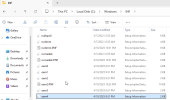
I could not uninstall them with the Target uninstall box. I did a manual uninstall within the c:\windows\inf path.
Ta
Screenshot 2025-04-20 at 13.59.21.png
Target did see that they were removed here.
Screenshot 2025-04-20 at 14.00.52.png
I restarted Win11 and opened Target 10 them mounted my NWL2. The USB signed drivers did appear with NWL2 mount. Target still can not find my NWL2. The strange thing is that Target 9 connects to my NWL2 ever time. Target 10 has connected 5 times, but never again. I have Exhausted all of my local knowledge. Dang Mac silicon + Utm + Win11 ARM. Anyone have ideas??? Anyone out there connect Target 10 with Mac silicon + Utm + Win11 ARM?
 
I had the same problem, not with UTM but with Parallels Desktop and the Phonak Target SW.
The solution (in Parallels Desktop) is to run the Noahlink Wireless firmware update before starting the Phonak Target. You can do this in two ways:
1.- Start Phonak Target ->Trial & Tools -> Firmware Update -> Select update noahlink wireless OR
2.- Run Program Files (x86)\Phonak\Phonak Target\NoahlinkWireless\NLWUpgrader.exe
When you run this, the updater will show you the latest firmware of your noahlink wireless (no need to do an update if you don't want to).
Running the update seems to "wake up" the connection, and the SW can detect the Noahlink device. I have to do this every time I want to run the software. I had the same problem with the Connexx fitting software.
Let us know if this works in UTM.
 
Wow. Thanks for the tip! I had 5 successful connections out of 50+++ attempts. Maybe that is the common denominator. I travel now and will check it out once home. I will advise of status then. Cheers!
 
Back
Top