
I am looking to ambilfon fitting soft ware

Nothing has changed since you asked → Last Year on this post.
You have to run the Normal Starkey fitting software (coupled with Starkey PatientBase) AND pass a parameter that causes the Normal Starkey fitting software to recognize Amplifon Hearing Aid models.

It's not simple. But it is achievable with the instructions found in a DIY School Hearing Aids (v2.2) PDF file named (Unlocking ReBranded Hearing Aids).

Here's a link to a → forum topic on the subject of Starkey Multi-Brand fitting for Amplifon Audibel Audika NuEar MicroTech +others
 
With Starkey PatientBase and Starkey Inspire installed;
You will need to enter a special Windows OS: Run Command as follows;

C:\Program Files (x86)\Starkey Laboratories\Inspire OS\Starkey.Inspire.Host.PatientBase.exe launch AmplifonFitting
 
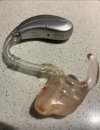
This hearing aids I need to know how to setup fitting soft
There are three software components. PatientBase is required, and then optionally, choose to install one or both of the fitting software components depending on your needs.
  • PatientBase (client database)
  • Starkey Inspire X (for Legacy hearing aids) is hidden
  • Starkey ProFit (for newer/current hearing aids) is hidden
Starkey can be setup to run as single-brand (Starkey), or setup to run as Multi-Brand, see the DIY School Hearing Aids PDF file (Unlocking ReBranded Hearing Aids) for a list of other ReBranded models.
 
Oh, from your picture that says (ampli-energy B) it may not be a Starkey ReBrand?? So as difficult as Starkey ReBrands are to connect to the software, it likely will not work for the (ampli-energy B) model.
screenshot_2025-05-15-18-48-52-459_com-brave-browser-edit-jpg.1145
 
Back
Top
