Oticon syia cic. Genie 2

Bmt

Member
Joined
Feb 4, 2024
Messages
119
Reaction score
4
I reject the gn resound cic its not work with old hi pro
I will get oticon syia 16 cic soon but i dunno if its work with old hi pro programmer or no. I read its need genie 2 fitting software and CS44 programming cabel. Can i get the genie 2 and will try if its connect with old hi pro or no
Any help plz
 
I reject the gn resound cic its not work with old hi pro
All (Hi Pro) hearing Aid Programming devices are old. Please read a DIY School Legacy Hearing Aids PDF file named (Evolution of the Hearing Aid Programming Devices).
  • Check the status of your Windows Driver for this device.
  • What action did you take (in the fitting software) to initiate connection to the hearing aids?
 
I think the updated versions of fitting software remove the old hi pro programmer from thier driver.
 
I think the updated versions of fitting software remove the old hi pro programmer from thier driver.
No.
All (Hi Pro) hearing Aid Programming devices are old.
  • You can use the Windows Device Manager to check the driver-status for a specific device.
  • Hearing Aid Fitting software does not automatically choose a hearing aid programming device.
  • Hearing Aid Fitting software does not automatically initiate a connection to your hearing aids.
 
Last edited:
i will re install the hi pro drivers and will re install the software again smartfit
i will try also install old version 1.18 smart fit
 
maybe they neglected the serial port and com of hi pro programmer
 
i will re install the hi pro drivers and will re install the software again smartfit
i will try also install old version 1.18 smart fit
That won't help,
maybe they neglected the serial port and com of hi pro programmer
They? This is the Windows setup on your computer.

Click Start;
  • Type "Device Manager" in the Search Box, and then Press Enter
  • Click the ">" Expansion Arrow on your Hi Pro device
 
Its in com port
Driver installed
But dunno why its not work with smart fit
Also i tried old version called standalone version i didnt find anything on it
Sorry cuz i asked so much
 
Its in com port
I don't know what that means? Can you show us a picture of your Device Manager / Hi Pro Device?
But dunno why its not work with smart fit
Define "not work with smart fit"? What are you expecting? Remember;
  • Hearing Aid Fitting software does not automatically choose a hearing aid programming device.
  • Hearing Aid Fitting software does not automatically initiate a connection to your hearing aids
Also i tried old version called standalone version i didnt find anything on it
Old version of what? And what were you expecting to find?
 
Last edited:
I was tried resound cic on smart fit didnt connect. Cuz no programmer found
I was asking about oticon syia if its connect to genie-2 and if it wany new programmer or old one will work
 
I tried old version for resound cic its called standalone fit and same thing didnt work
 
I tried old version for resound cic its called standalone fit and same thing didnt work
There is no hearing aid fitting software that I know of named "standalone fit"?? Perhaps you are referring to method of installation (with Noah Database System) or (without Noah Database System sometimes). Without Noah is called Standalone because the fitting software will use its own built-in database to store each client's settings.

Typically, you should use the latest version of the fitting software for your Legacy model, or the latest version of fitting software for your current/newer model. This helps to insure that you get the latest bug fixes and the latest hearing aid firmware.

Also, this topic is about Oticon Siya CIC. We should use a different topic to talk about GN ReSound hearing aid models to avoid confusion.
 
I was asking about oticon syia if its connect to genie-2 and if it wany new programmer or old one will work
Run the Genie 2 fitting software
In the left pane (at the bottom) Click the "?" for Help
Select Open help file
Type "cables" in the search box and press Enter
Click "Cables and adapters"
Click "Custom Styles"
 
I was asking about oticon syia if its connect to genie-2 and if it wany new programmer or old one will work
New Hi Pro hearing aid programmer/Old Hi Pro hearing aid programmer? Consider ALL Hi Pro or mini Pro as "OLD"/Legacy.
Even the Hi Pro 2 can be considered as "OLD"/Legacy!

Look at Page 12 of this → Oticon-siya-product-brochure PDF.

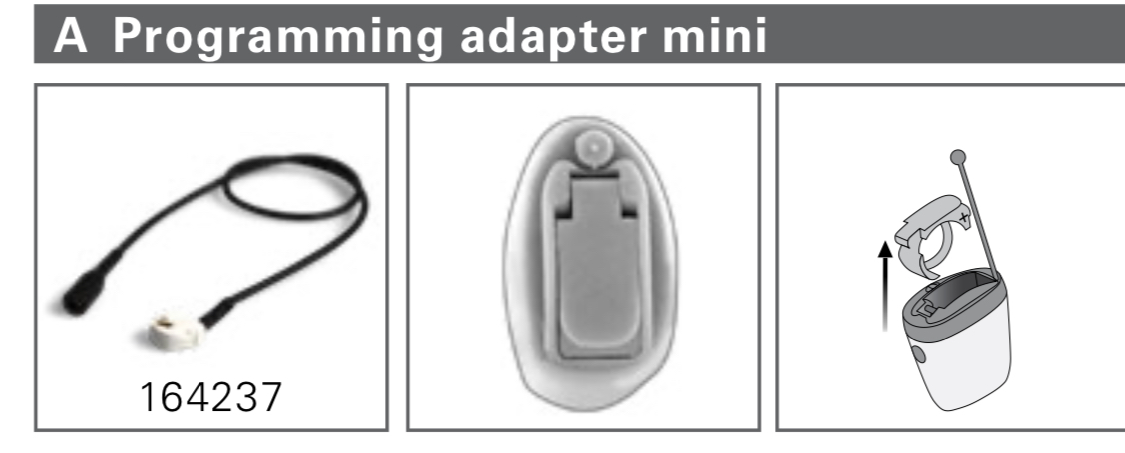
I think the Siya CIC model is too small to contain a 2.4GHz Wireless Radio. Therefore it cannot use a wireless hearing aid programming device. Therefore, you will need a special adapter (Programming Adapter Mini) to fit inside the Siya CIC after you remove the battery door.

d0219be89798378561bf37800bc1f385e48fb127.jpeg
 
Last edited:
Sure friend i will read the help and fitting cables and try ro find it on jordan
Not easy to find the cabels here
Or i will try get them online maybe e bay site.
Thanks alot


But i read in chat gbt maybe you can but file from new driver hi pro 2 programmer on the programm file on windows and maybe it work
But didnt dind the file
Its. Dll so no chage available on file.
 
Not easy to find the cabels here
Or i will try get them online maybe e bay site.
The cables are easy. The Adapter may be difficult to find.
 
CAUTION: your limited technical knowledge is not likely to provide successful results. ¯\_(ツ)_/¯
But you can keep trying if you like.
 
Back
Top