pvc
Well-Known Member
- Joined
- Apr 12, 2023
- Messages
- 3,583
- Reaction score
- 869
Some clips below from the Phonak Target section of a DIY School PDF file named (Unlocking ReBranded Hearing Aids); You should read the PDF File itself for more complete information.
Note that pin-code locks (discussed below) that unlock some locked hearing aids are mentioned in this document. The pin-codes are not new information. Most of the pin-codes are currently being circulated privately and some are being circulated in public.
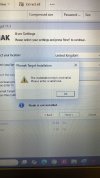
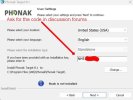
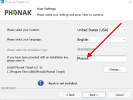
This is where you enter the lock code when installing Phonak Target. Please note that the Phonak Target update page (which allows you to check for new Phonak Target software updates and new media updates) will be missing after using the lock code. Please do not panic as you can revert to your normal Phonak version (by using code = Phonak) to receive new software updates (if any).
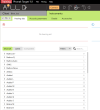
Several NHS models will be unlocked-and-listed in Phonak Target by using a single lock code. These are;
Note that pin-code locks (discussed below) that unlock some locked hearing aids are mentioned in this document. The pin-codes are not new information. Most of the pin-codes are currently being circulated privately and some are being circulated in public.
This is where you enter the lock code when installing Phonak Target. Please note that the Phonak Target update page (which allows you to check for new Phonak Target software updates and new media updates) will be missing after using the lock code. Please do not panic as you can revert to your normal Phonak version (by using code = Phonak) to receive new software updates (if any).
Several NHS models will be unlocked-and-listed in Phonak Target by using a single lock code. These are;
- Nathos S+ micro
- Nathos S+ M
- Nathos S+ SP W
- Nathos S+ UP W
- Nathos S+ micro W
- Nathos S+ M W
- Nathos S+ RIC W
- Nathos S+ ITC W
- Nathos S+ ITE W
- Nathos Q Tinnitus
- Nathos Auto Micro
- Nathos Auto M
- Nathos Auto SP
- Nathos Auto UP
- Nathos Auto Ric
- SYNC HP
- SYNC micro
- Nathos Nova M
- Nathos Nova PR
- NHS Nathos S+ is the Naida S V SP, Target unlock code is available
- NHS Nathos SP/UP is the Naida V SP/UP, Target unlock code is available
- NHS Nathos S+ SP/UP is the Naida S V SP/UP, Target unlock code is available
- NHS Nathos S+ M is the Solana H2O M13, Target unlock code is available
- NHS Nathos M is the Versata M, iPFG unlock code is available
Last edited: