

You are using an out of date browser. It may not display this or other websites correctly.
You should upgrade or use an alternative browser.
You should upgrade or use an alternative browser.
DIY School Hearing Aids (v2.2)
- Thread starter pvc
- Start date

pvc
Well-Known Member
- Joined
- Apr 12, 2023
- Messages
- 3,583
- Reaction score
- 869
That would be Signia Connexx AudioService 9.13.0 / AudioFit 9.13.0 for AudioServicethe latest version of AudioFit for AudioService (9.12?).
winstan001
New Member
- Joined
- May 1, 2025
- Messages
- 4
- Reaction score
- 2
Is there a link to resound software?
Hi I'm a recent noob to HA DIY, been lurking and learning ... I have been prescribed a pair of NHS Oticon Optim HA's and thought I could just use latest Genie2 2005 (Found Oticon link in some source code on Github for an older version, downloaded and installed it and updated to current) and Noahlink Wireless 2 to read/write to them but I cannot find any reference to Oticon Optim in the Genie2 software They are a BTE model and in my flat I cannot get NW2 to connect to the HA's with new batteries and restarted even when resting the HA's on the NW2... there is 2.4GHz Wi-Fi and android TV Bluetooth enabled but that *shouldn't* block BTLE and doesn't block my android phones BTLE connection using Oticons android companion app that connects to both HAs. Do I need to take my laptop and NW2 and HAs out in my car to field in the middle of nowhere or is the Oticon Optim incompatible with Genie2 and NW2?
pvc
Well-Known Member
- Joined
- Apr 12, 2023
- Messages
- 3,583
- Reaction score
- 869
HMm; Do you know which Oticon model the NHS Oticon Optim model is a copy of?
I believe it is old/Legacy and not likely to connect via a wireless hearing aid Programming device.
Here's a chart (which is available from inside the Legacy Genie 2017.1 fitting software;

I believe it is old/Legacy and not likely to connect via a wireless hearing aid Programming device.
Here's a chart (which is available from inside the Legacy Genie 2017.1 fitting software;
in Genie 2... it looks similar to Ruby BTE in shape and colour and battery type. There are no external contacts and audi fitting was done wireless, including sending the various sounds showing what the startup and low bat sounds etc were and feedback setting while I was wearing them wirelessly. Does genie2 connect to any BTLE compatible HA or must the type of HA be specified precisely within the program for it to connect? I got the Optim name from what's printed on the HA themselves and what Oticons companion app reports the connected HAs as when it's running. looks like I'm going to have to try and convince my audi to tell me what instrument she has set in genie2... I doubt she'll tell me... and that will be in a few months time to my next appointment, well past amazons return window for the noahlink wireless 2.HMm; Do you know which Oticon model the NHS Oticon Optim model is a copy of?
I believe it is old/Legacy and not likely to connect via a wireless hearing aid Programming device.
Here's a chart (which is available from inside the Legacy Genie 2017.1 fitting software;
pvc
Well-Known Member
- Joined
- Apr 12, 2023
- Messages
- 3,583
- Reaction score
- 869
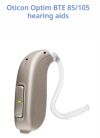
Did you click the link that I post above and quoted again here (above)? Instead, I will post a picture so you don't have to click the link. Does it look exactly like this with the same slim tube?Is it one of → These?
Last edited:
pvc
Well-Known Member
- Joined
- Apr 12, 2023
- Messages
- 3,583
- Reaction score
- 869
The assumptions you are making about connectivity for ReBranded hearing aids are likely not correct. You can read a DIY School Hearing Aids (v2.2) PDF File named (Unlocking ReBranded Hearing Aids), and scroll down to the Oticon section because the document is alphabetized by manufacturer. Though, if it is code locked I have not yet seen a code for the Oticon Optim model.
The DIY School Hearing Aids (v2.2) access portals are at your finger tips via 24/7 cloud storage access.
The DIY School Hearing Aids (v2.2) access portals are at your finger tips via 24/7 cloud storage access.
- Start here → DIY School Hearing Aids (v2.2) to find the access portals
- You can easily find the Access Portals again/anytime, by clicking any PVC Avatar (click twice - counting the 2nd popup Avatar)
- When logged in, you can find the Access Portals again/anytime, by clicking a Link in my Signature
- And finally, you can perform a simple Internet search for "DIY School Hearing Aids"
Click this Access Portal for → DIY School Hearing Aids (v2.2) Cloud Storage
Click this Access Portal for → DIY School Legacy Hearing Aids (v2.2) Cloud Storage (static/no-updates)
What is DIY School Hearing Aids? It’s simply a collection of PDF files residing in cloud storage. Click one of the Access Portal to have a quick look at the PDF files inside DIY School Hearing Aids. The PDF files provide help with many self programming tasks, including the following two prerequisites.
That’s it, Ta-da!!
- Software Prerequisite: Download the fitting software. Read about software download instructions in the first PDF file named (01 Free Hearing Aid Fitting Software). The links within that PDF file may take you to directly a download site or, provide community share instructions for how to obtain hidden software.
- Hardware Prerequisite: In addition to obtaining free fitting software, you will also need to use a Hearing Aid Programming Device/hardware. For most (but not all) recently sold hearing aids, the device you will need is Noahlink Wireless. Some think that Remote Fitting can be used take the place of this hardware prerequisite. It cannot! Sorry, it requires a professional account! This non-trivial task will require your due diligence!
Tip for finding DIY School Hearing Aids (v2.2) again if you get lost and wish to return;
Tip for getting started with DIY Self Fitting: Read these DIY School Hearing Aids PDF files:
- You can Click my Signature for a DIY School Hearing Aids Access Portal (login required)
- You can Click my pvc Avatar for a DIY School Hearing Aids Access Portal (login required, click the 2nd popup Avatar too)
- You can view this OP/Original Post of this Topic for the DIY School Hearing Aids Access Portal
- You can perform an Internet search for "DIY School Hearing Aids"
Tip for finding fitting software: Read the DIY School Hearing Aids PDF file named (01 Free Hearing Aid Fitting Software). Also scroll down below to find recent posts/comments from others seeking free fitting software. Feel free to post your own request for free fitting software below, as a new reply on this thread/topic. You will likely find other DIYers who are willing to share.
- 02 How to Program Your Hearing Aids
- 01 What to Expect for your First Fit
Appendix: List of frequently requested software;
- Phonak Target 9.1.0 (or latest) for Newer/Current
- Oticon Genie 2 2024.1 (or latest) for Newer/Current
- Rexton Connexx 9.11.10/RexFit9.11.10 for Rexton Newer/Current
- Connexx 9.11.10/SiFit9.11.10 for Signia Newer/Current
- GN ReSound Smart Fit 1.18 (or latest) for newer/current hearing aids and Aventa 3 for older/Legacy hearing aids
- Starkey Pro Fit 2024.1 aka-3.0 (or latest) for newer/current hearing aids
- Starkey Inspire X 2023.1 for older/Legacy hearing aids
- Unitron Unitron TrueFit 5.5.1 for Newer/Current
- Widex Compass GPS 4.7 (or latest) for Newer/Current
- Philips HearSuite 2024.1 (or latest) for Newer/Current
Appendix: List of less-frequently requested software;
Appendix: List of re-branded Starkey fitting software;
- Bernafon Oasis 26.2 / Oasis 2019.2 software for Older/Legacy
- Bernafon OasisNxt 2024.1 (or latest) software for Newer/Current
- Rexton Connexx 6.5.5/RexFit6.8.4 for Older/Legacy
- Connexx6.5.5/SiFit6.10 for Signia older/legacy
- Connexx7.5.2/SiFit7.5.1 for Signia intermediary/legacy
- Oticon Genie 2017.1 for older/legacy
- Phonak iPFG2.6e - Legacy
- Phonak PFG8.6c - Legacy
- Unitron Ufit for older/legacy
- Unitron Unifit5.52A even older legacy
- Widex COMPASS V5 - Legacy
- A&M Connexx 9.6.6 with AMFit 9.6.10 (or latest) for newer/current
- Argosy iPFG
- Audifon (AudiFit4 and AudiFit5)
- Audio Service Connexx6.5.4/AudioFIT6.8.5 for older/legacy
- Audio Service Connexx9.8.5/AudioFit9.8.11 (or latest) for newer/current
- Aurafit Relate-United HealthCare for newer/current Relate/Unitron
- Beltone Solus Max 1.17 + BT Solus Pro 1 (both included in the same download)
- Danavox Danafit 1.5
- Electone Elecfit6.4
- EXPRESSfit 6.4 for legacy Sonic products
- EXPRESSfit 2017 for older Sonic products
- EXPRESSfit PRO 2022.2.1 (or similar) for newer/current
- Hansaton Connexx6.5.5/HansaFit6.21 for older/legacy
- Hansaton Connexx8.3.6/HansaFit8.3.0 for intermediary/legacy
- Hansaton Scout 3.6.1 for newer/current
- GN ReSound Interton fitting_1.18 (or latest) + appraise2.4, also compufit 4.4
- Miracle Ear Harmony6.5.4/me6.10.3 for older/legacy
- Miracle Ear HarmonyII9.0.8/me9.0.5 for newer/current
- NewSoundFit 6.1.12 for Newsound
- AGX/AudigyGroup
- Amplifon
- Audibel
- Audika
- AudioSync (Brazil = Portuguese) (Pro Akustik = German)
- Horex (German/Deutsche)
- KIND
- Lisound (Chinese/Zhongguo)
- Medtronic
- MicroTech
- Starkey
- NuEar
- Visaudio (French/Francaise)
- Disclaimer: Hearing aids come in different models for different hearing losses (mild, moderate, severe, profound). Heed the warnings that come with power hearing aids like this example>> CAUTION: BTE Power hearing aid is a powerful hearing instrument. If you have been fitted with BTE Power, never allow others to wear your hearing instruments as incorrect usage could cause permanent damage to their hearing.
- Disclaimer: These DIY School hearingdocuments are not meant to encourage self-fitting of your hearing aids. It can be technically challenging and is not for everyone. Though, if you have already decided to self-fit your hearing aids then you may benefit from this extra information on the subject. Also this extra information may come in handy simply for gaining more knowledge about what your audiologist is doing (or not doing) for you.
- Disclaimer: The author of these documents did not invent Anonymous Community File Sharing. Community file sharing predates anything this author has envisioned, or written, or published.
Dear friend.The assumptions you are making about connectivity for ReBranded hearing aids are likely not correct. You can read a DIY School Hearing Aids (v2.2) PDF File named (Unlocking ReBranded Hearing Aids), and scroll down to the Oticon section because the document is alphabetized by manufacturer. Though, if it is code locked I have not yet seen a code for the Oticon Optim model.
The DIY School Hearing Aids (v2.2) access portals are at your finger tips via 24/7 cloud storage access.
- Start here → DIY School Hearing Aids (v2.2) to find the access portals
- You can easily find the Access Portals again/anytime, by clicking any PVC Avatar (click twice - counting the 2nd popup Avatar)
- When logged in, you can find the Access Portals again/anytime, by clicking a Link in my Signature
- And finally, you can perform a simple Internet search for "DIY School Hearing Aids"
I am new her so don't know all the rules.
I will be grateful if you help me to get widex GPS software 4.8 or newer.
Thanks again.
Regards

Hello. I recently just replaced my Rexton HA's (which you assisted me with programming software) for a new pair of Jabra Pro 30's. Could you help me again this time with programing software for these? I believe that these use the latest smartfit software (2.x?). Thanks very much for your help in advance!