I have the Phillips hearlink 9050 and have installed HeatSuite 2035.1. I am using a Noahlink wireless 2.
I cannot get the the software to detect the 9050s. The Noahlink works on Rexton and a phonak Audeo sphere i90.
This clip from a DIY School Hearing Aids (v2.2) PDF File named (Noahlink Wireless 2 – DIY User Guide)
How to connect the Fitting Software to your Hearing Aids?
Again; this is Bluetooth Low Energy/BLE, which is not the same as BlueTooth used in cellphones and such. So forget about typical pairing. There is no pairing involved. Instead you need to Connect. But first choose a device location with a clear line-of-sight to the hearing instruments and away from interfering wireless sources (WLAN, streamers).
In your fitting software you will need to Select or Specify that Noahlink Wireless is to be used as your programming device. Your fitting software may be defaulting to a different programming device. So check this first.
Prepare the hearing aids to enter fitting mode. This is accomplished with an off-on cycle of the hearing aids. For disposable battery models open and close the hearing aid battery doors. For rechargables apply a very long button press for off and repeat for on. Or, place them in your charger and then remove them in order to turn the hearing aids off and on.
Tip: Don’t walk away from your computer/Noahlink Wireless with connected hearing aids in your ears! This is especially important during lengthy hearing aid firmware updates and could result in bricking some hearing aid models.
Your fitting software may require that you Click an option to Connect to your hearing aids. But there could also be prerequisites such as (selecting a client). Optionally, your fitting software may automatically connect after you have selected a client and proceed into the fitting session.
Your hearing aids may need to have Bluetooth turned off for a connected cellphone before trying to connect Noahlink Wireless to your hearing aids.
You should be able to connect easily after you have;
Installed the fitting software first (before plugging-in Noahlink Wireless) to provide a driver.
Connected your Noahlink Wireless device via a USB port/non-USB hub.
Verified that your hearing aids do indeed support the Noahlink Wireless BLE protocol.
Prepped your hearing aids to enter fitting mode/off-on cycle.
Selected Noahlink Wireless as your programming device in the fitting software.
Turn Bluetooth off for any other connected-to-HA devices.
Taken the proper fitting software action (perhaps clicking a Connect option) to Connect the fitting software to your hearing aids.
Sometimes signal interference may occur? Try putting your hearing aids right next to Noahlink Wireless to avoid signal interference.
I may have to update Noahlink Wireless 2 – DIY User Guide for a driver issue (see this → post). But first let us see if we can confirm that we have followed to usual prerequisites listed above.
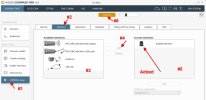
Also; This clip from a DIY School Hearing Aids (v2.2) PDF File named (Fitting Instructions Widex Compass GPS);
To setup a specific wireless programming device run Compass GPS and then; #1 Click Compass setup #2 Click Interface #3 Select your wireless programming device in Available Interfaces #4 Click the Add button to add your device to Current Interfaces #5 Your device is added to Current Interfaces #6 Click Connect
Optionally (if you have multiple Current Interfaces) you can use the Pulldown selection next to the Connect button (#6) and select any other wireless programming devices you want to use.
You should call it (Noahlink Wireless or Noahlink Wireless 2) because sometimes newbies get burned by buying an old obsolete hearing aid programming device named NOAHlink.