

Need help: Philips 9050 cannot connect to HearSuite 2024.2

So @lamcom -> to summarize, your copy of HearSuite didn't work but reinstalling @pvc 's copy of his HearSuite works? Where did you get your copy of HearSuite in the first place? Did you record your HearSuite's version number and the one from @pvc to compare to see if they are different version numbers?
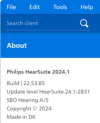
below was the version which failed to connect to 9050:
1727321527981.png
The auto-updater keeps saying that my version was up to date. That was part of the reasons which fooled me. below is the courtesy version from @pvc :
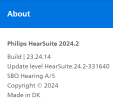
1727321786875.png
 
Pfft; I need to update my firmware. I am one version back. I will see if I can find the command to check Noahlink Wireless 2 firmware version in Philips HearSuite.
Hi @pvc,
I have downloaded the exe file and tried to open it, but Iam unable to open it. Can you please help me out with this.
Thanks
 
I have downloaded the exe file and tried to open it, but Iam unable to open it. Can you please help me out with this.
Sure. I need a little more information. Which (.exe file) are we talking about?

ETA:Edit To Add; Okay I think we are talking about the HIMSA Noahlink Wireless Firmware Upgrade .exe file.

Don't run this unless you need it. Firmware Updates are destructive and can Brick the hardware device. I believe your problem may simply be a missing Noahlink Wireless driver because you plugged in your Noahlink Wireless before installing the fitting software which provides the necessary driver. See your other post, → Do we need to install any driver to use Noahlink Wireless?
 
Last edited:
Yes, please read you PM/Conversation for information on how to find Philips HearSuite 2024.2
Would it be possible to get the instructions to download 2024.2. Mine is stuck on 2024.1 as well.
 
Hi PVC, could i get instructions on how to download Hearlink 2024.2 please I have the same kind of issue as OP
 
Hi @fish99 Welcome;
Please read your PM/Private Message/Conversation for information on how to find Philips HearSuite 2024.2
 
Hi PVC, I got a new pair of 9050, could i get instructions on how to download Hearlink 2024.2. Thanks
 
I have the same issue with 2024.1 for my new Phillips 9050. I would appreciate if you could share with me the details of how to download Hearlink 2024.2. Thank you so much in advance.
 
I just got a pair of Philips 9050 HAs. They have been programmed with my prescription in Costco. I have problem to connect them to HearSuite 2024.2 via Noahlink 2. The error message was “Instrument is not supported in the fitting software”. (Note that the Noahlink is recognized by HearSuite; Bluetooth turned off from cellphone; HAs were reset with Charger). Any ideas to share?
nevermind , i didn't see page 2 of this topic
 
Last edited:
I just got a Philips 9050 from Costco. I was hoping to use it with Philips Hearsuite - I have the latest version 2024.2, Build 23.24.14. My Windows 11 PC connects directly (no hub) to a Noahlink Wireless 2 with the latest firmware (3.23). I used Noahlink's April 2025 Firmware Upgrader 3.3.0.0 to do the update. I also reinstalled the Noahlink W11 drivers and rebooted.

However, when I attempt to connect it recognizes the Noahlink Wireless Device showing the correct serial number and flashes green lights on the Noahlink, but does not find the 9050 hearing aids. I get a "No instruments detected" message. I have tried turn the 9050's off and back on to be sure any prior Bluetooth connections were cleared.

I have read this thread. No sure what else to do. I do not think Costco locks the device. In fact, I told the hearing aid specialist who does the fitting that I planned to use the software at home and he did not indicate any issues (other than not messing everything up.)

I am able to connect to the 9050's using the Hearlink app installed on two of my Android devices (Motorola mobile phone and Samsung tablet). The tablet is an older model and connection to it is not as reliable as the newer Moto phone.
 
Last edited:
HMm; maybe try Philips HearSuite 2025.1
 
HMm; maybe try Philips HearSuite 2025.1
Thanks for the tip. My Hearsuite updater notices were not working because I had configured Windows 11 not to pester me with notices. After turning notices on, I was able to download and install 25.1 using the update program. So, I tried it again while wearing the 9050 aids, but it still would not connect. I will remove them later and do a complete on-off cycle and a reboot my PC to see if it makes any difference.

I notice that the HearLink 9050 family now shows 3 different models in HearSuite: HL9050 MNR, HL 9050 CIC, and HL 9050 IIC. The sticker on my box from Costco indicates it is a "Hearlink 9050 MNR GR" (i.e. the MiniRITE). Not sure what the GR indicates.
 
Your rechargeable hearing aids (and all rechargeable hearing aids) only remain in connection mode for some small number of minutes after a hearing aid startup-cycle. The reason for this, is to not waste battery power and hearing aid computer power for unnecessary or rarely occurring events such as;
  • Bluetooth pairing requests
  • Connection to hearing aid fitting software requests
Why is checking for those seldom used tasks performed only during the start-up cycle. So that your hearing aid firmware can concentrate on the important task of monitoring-and adjusting your hearing soundscape instead of (wasting time and CPU-cycles) checking for events that occur only occasionally.

It's up to you to manually invoke connection mode (when you need it) for pairing, or for connecting to the hearing software. You can easily accomplish connection mode by briefly placing your hearing aids in the charger.
 
Last edited:
I was able to get it to connect today. It probably did not make any difference, but I plugged the Noahlink 2 into a USB3 port on the back of the PC rather than a USB2 on the front of the computer that was not working yesterday (the front USB2 port goes directly to the PC's motherboard and not through a hub). I had to try about 3 times with the hearing aids a few inches from the Noahlink, but it did connect.. I did a manual on-off recycling. I connected a second time much more quickly.
 
Does anyone know where Hearsuite stores individual patient data files and what the file extension is. I opened my file and went to Export Clients in the file menu. I got a file with a "*nhax" extension. This looks more like a Noah file rather than a Hearsuite one. I am hoping that when I have more first follow-up visit, I can persuade them to provide me a copy of my data file so I can import it into my PC and have it as a reference.

This is also important because I do regular data backups and want to be sure my hearing aid information is backed up.

I can anticipate that over time, I might experiment with various profiles and come up with settings that work best for me. The first setting I got works reasonably well, but there are some things I would tweak if I knew how to do it.
 
I opened my file and went to Export Clients in the file menu. I got a file with a "*nhax" extension.
The .nhax file extension is the correct file. You can test it real easy. Delete all your clients, then import the file. It should import all clients and client sessions/
 
Clip from a DIY School Hearing Aids (v2.2) PDF file named (02 How to Program your Hearing Aids);

Education via Utube Video:

Thanks to HoH-Community member @raylock1 for this video link about → How to DIY Program Hearing Aids Yourself from BRIAN (@hearing club) or (BRIAN @the hearing club). I am unsure about the various hearing-club handles since we have been buying flex connects and battery pill adapters from a similar-named website for many years?

The video is about Philips HearSuite fitting software for Philips 9030/9040/9050 hearing aids. But the video easily translates to Oticon/Bernafon, and the concept itself can be applied to most other hearing aid brands. I am not saying this is what you should do. I'm just saying this gives you insight on the vast number of settings that can be adjusted.
 
The .nhax file extension is the correct file. You can test it real easy. Delete all your clients, then import the file. It should import all clients and client sessions/
Thanks. I did a save for just the one client (me) rather than all. So, I assume that Costco (if they were so inclined) could do the same thing and give me a copy of my file on a thumb drive (or even email me the file as it is pretty small).

So, do you know the default location in Windows for HearSuite *.nhax files?
 
So, do you know the default location in Windows for HearSuite *.nhax files?
Likely your Windows downloads folder.

I assume that Costco (if they were so inclined) could do the same thing and give me a copy of my file on a thumb drive (or even email me the file as it is pretty small).
Don't bother your audiologist with such trivia. ¯\_(ツ)_/¯
 
Back
Top