

You are using an out of date browser. It may not display this or other websites correctly.
You should upgrade or use an alternative browser.
You should upgrade or use an alternative browser.
Oticon Audika
- Thread starter Sara
- Start date

pvc
Well-Known Member
- Joined
- Apr 12, 2023
- Messages
- 3,583
- Reaction score
- 870
Hi Sara; You would use Genie2 2023.2 fitting software.
Read your PM/Conversation for information about how to find Oticon Genie2 2023.2
But before you get your hopes up, please read a DIY School Hearing Aids PDF file named (Unlocking ReBranded Hearing Aids) because these ReBranded Audika hearing aids are probably Locked!!
Some Audika Links;
Read your PM/Conversation for information about how to find Oticon Genie2 2023.2
But before you get your hopes up, please read a DIY School Hearing Aids PDF file named (Unlocking ReBranded Hearing Aids) because these ReBranded Audika hearing aids are probably Locked!!
Some Audika Links;
- Link → Audika Group
- Link → Audika Group (find-local-clinic)
- Link → HearingLife one of the clinics randomly picked
Last edited:
pvc
Well-Known Member
- Joined
- Apr 12, 2023
- Messages
- 3,583
- Reaction score
- 870
A clip below plucked from a DIY School Hearing Aids PDF File named (Noahlink Wireless - DIY User Guide) as a reminder for future readers to first rule out other connection problems such as the hearing aids are not in "fitting mode".
- Connect your Noahlink Wireless device to a USB2 or USB3 port (non-USB hub) on your computer and in a location with a clear line-of-sight to the hearing instruments and away from interfering wireless sources (WLAN and streamers).
- In your fitting software you will need to Select or Specify that Noahlink Wireless is to be used as your programming device. Your fitting software may be defaulting to a different programming device. So check this first.
- Prepare the hearing aids to enter fitting mode. This is accomplished with an off-on cycle of the hearing aids. For disposable battery models open and close the hearing aid battery doors. For rechargables apply a very long button press for off and again for on. Or, place them in your charger and then remove them in order to turn the hearing aids off and on.
Last edited:
Yes, I've done all that but it doesn't detect them. I've already connected other Phonak and Widex hearing aids to the Noahlink Wireless, but the audika hearing aids don't detect them. That's why I thought maybe it would use other software.
pvc
Well-Known Member
- Joined
- Apr 12, 2023
- Messages
- 3,583
- Reaction score
- 870
The fitting software is a large and difficult hunk of software to write-and-maintain. So it's unlikely that a manufacturer would write (and maintain) another version of Genie 2 fitting software.
Try asking the clinic audiologist for the lock code. It can't hurt to ask. Even if they don't provide the code, their response may be revealing.
Try asking the clinic audiologist for the lock code. It can't hurt to ask.
Even if they don't provide the code, their response may be revealing.
pvc
Well-Known Member
- Joined
- Apr 12, 2023
- Messages
- 3,583
- Reaction score
- 870
Also FIY for future readers; This same (no resale value concept) applies to all rechargeable hearing aids that are sealed/without-battery-doors, and thus require factory repair to replace the batteries. No one will want to buy used/sealed/out-of-warranty rechargeable hearing aids with depleted batteries.
Since Oticon has the only rechargeable hearing aids with a battery door, this means only Oticon rechargeable hearing aids will have resale value. The others (all of them) are disposable.
Though time is of the essence, and you might use factory repair under warranty to mitigate or postpone the inevitable failure/disposal date.
Since Oticon has the only rechargeable hearing aids with a battery door, this means only Oticon rechargeable hearing aids will have resale value. The others (all of them) are disposable.
Though time is of the essence, and you might use factory repair under warranty to mitigate or postpone the inevitable failure/disposal date.
pvc
Well-Known Member
- Joined
- Apr 12, 2023
- Messages
- 3,583
- Reaction score
- 870
Thanks for that.
HMm; Maybe when you use the correct lock code (or similar trigger) then Genie 2 automatically changes names from Oticon to Audica.
Starkey Inspire-or-Profit fitting software does something similar for example; If you run Starkey Inspire with a "launch parameter"
HMm; Maybe when you use the correct lock code (or similar trigger) then Genie 2 automatically changes names from Oticon to Audica.
Starkey Inspire-or-Profit fitting software does something similar for example; If you run Starkey Inspire with a "launch parameter"
- Start "" "C:\Program Files (x86)\Starkey\ProFit\ProFit.Host.PatientBase.exe" launch AudibelFitting
pvc
Well-Known Member
- Joined
- Apr 12, 2023
- Messages
- 3,583
- Reaction score
- 870
Here's a clip from near the end of a DIY School Hearing Aids PDF file (Unlocking ReBranded Hearing Aids) so you can see a version of these tricky multi-brand choices and, of course the version provided to the franchise would be very simple without all these tricky choices because the franchise only needs to run one specific choice.
Starkey ReBranded Models:
Both the Starkey Pro Fit and Starkey Inspire can be used with Starkey's multi-branded products for other rebranded models (see rebranded names in the list below). Below are simplified instructions (3 steps) for running the Inspire or ProFit as a multi-branded product:
Step 1: Right-click the Windows Start button and select Run, or press (Win-Key + R)
STEP 2: Enter the fitting software to be run (Inspire or ProFit), "exact" as follows, where "xxx" indicates a specific selection from the following options.
Tip: Use the cut-and-paste method. Typing is too cumbersome;
• C:\Program Files (x86)\Starkey Laboratories\Inspire OS\Starkey.Inspire.Host.PatientBase.exe launch xxx
• C:\Program Files (x86)\Starkey\ProFit\ProFit.Host.PatientBase.exe launch xxx
Step3: Click OK
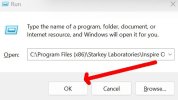
That's it! Tada!
Your options for replacing xxx
Starkey ReBranded Models:
Both the Starkey Pro Fit and Starkey Inspire can be used with Starkey's multi-branded products for other rebranded models (see rebranded names in the list below). Below are simplified instructions (3 steps) for running the Inspire or ProFit as a multi-branded product:
Step 1: Right-click the Windows Start button and select Run, or press (Win-Key + R)
STEP 2: Enter the fitting software to be run (Inspire or ProFit), "exact" as follows, where "xxx" indicates a specific selection from the following options.
Tip: Use the cut-and-paste method. Typing is too cumbersome;
• C:\Program Files (x86)\Starkey Laboratories\Inspire OS\Starkey.Inspire.Host.PatientBase.exe launch xxx
• C:\Program Files (x86)\Starkey\ProFit\ProFit.Host.PatientBase.exe launch xxx
Step3: Click OK
That's it! Tada!
Your options for replacing xxx
- AudigyGroupFitting
- AmplifonFitting
- AudibelFitting
- AudikaFitting
- AudioSyncGeneralFitting
- HorexFitting
- KINDFitting
- LisoundFitting
- MedtronicFitting
- MicroTechFitting
- Starkey
- NuEarFitting
- VisaudioFitting
- MiracleEar
Last edited:
pvc
Well-Known Member
- Joined
- Apr 12, 2023
- Messages
- 3,583
- Reaction score
- 870
Thank Sara for being so inquisitive. Maybe Genie2 now has the ReBranded Audika models as an optional built-in flavor?
Here's an Example of a similar option for Starkey Inspire Audika; Though French language is the only choice
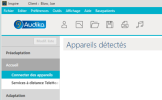
Maybe Genie2 now has the ReBranded Audika models as an optional built-in flavor?Here's an Example of a similar option for Starkey Inspire Audika; Though French language is the only choice
Very interesting, but I don't agree with companies that block hearing aids so that only they can program them.
I finally went to a center that sells Phonak and I'm testing the Lumity 90. I also want to try oticon real 1 in another center and decide between the two of them.
I finally went to a center that sells Phonak and I'm testing the Lumity 90. I also want to try oticon real 1 in another center and decide between the two of them.
pvc
Well-Known Member
- Joined
- Apr 12, 2023
- Messages
- 3,583
- Reaction score
- 870
Ah, the ReBrand Hearing Aids Plot Thickens!
As per HIMSA → IMC Compliancy test results for → Demant/Oticon
there are two additional modules and maybe even more later??
As per HIMSA → IMC Compliancy test results for → Demant/Oticon
there are two additional modules and maybe even more later??
- Amplifon Genie 2 2023.2
- Audika Genie 2 2023.2
Last edited:
tonimanola
New Member
- Joined
- Oct 13, 2026
- Messages
- 5
- Reaction score
- 0
I have audika g300 and not working with genie 2 standard. How i can do to DIY?Updated two DIY School Hearing Aids PDF Files to add Audika/Oticon to the list of New-anyname-franchises that sell ReBranded hearing aids;
- Unlocking ReBranded Hearing Aids
- 解锁重塑品牌助听器