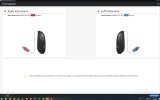
Hello, I've been familiarizing myself with SmartFit software and practicing in simulation mode for lhe last week or two. This week, I got my first hearing aids (Jabra Enhance Pro 30 EP362 (RIE) 2MP Receiver). When I connect them to SmartFit (version 2.1.305.17), I get this message "Both instruments that you are about to connect do not appear on your instrument list in fitting software. But you may still fit and save changes to the instruments".
The fitting process does still work and I can successfully download my changes into the EP30's. The initial fit from Costco fit had Clear Focus directionality used in the Hear In Noise program. But now, SmartFit is not showing Clear Focus as an option. I have Front Focus, AutoScope, Fixed, Spatial, Soft Switching. I'm not sure where to go from here. Does anyone know how I can get Clear Focus in the pulldown menu?
Thanks in advance for your help
The fitting process does still work and I can successfully download my changes into the EP30's. The initial fit from Costco fit had Clear Focus directionality used in the Hear In Noise program. But now, SmartFit is not showing Clear Focus as an option. I have Front Focus, AutoScope, Fixed, Spatial, Soft Switching. I'm not sure where to go from here. Does anyone know how I can get Clear Focus in the pulldown menu?
Thanks in advance for your help